
Best iPhone 17 Pro Max Cases
As an Amazon Associate, I earn from qualifying purchases. Some links may earn us a commission at no extra cost to you.
If you’re protecting an iPhone 17 Pro Max, I’d focus on 3 things: camera-lip protection, button feel (especially Camera Control), and MagSafe/Qi2 friendliness so chargers, mounts, and wallets don’t slide around.
How I researched
How I researched — I compared recent iPhone 17 Pro Max case lineups and spec sheets (last 6–12 months), prioritized MagSafe-friendly fit + real-world protection features, checked Camera Control coverage/cutout approach, noted mainstream availability (so you’re not stuck with a weird variant), and weighed durability vs. bulk and day-to-day usability.
Top picks
OtterBox Defender Pro Series — Best for maximum drop protection
If you want the “I don’t want to think about it” rugged option, Defender Pro is the safe pick.
Why it wins: thick, grippy build with extra protection details (like port coverage on many Defender-style designs).
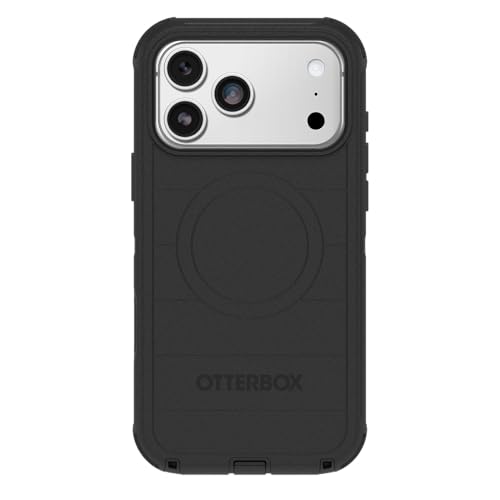
- PRECISION FIT – Engineered to match the exact dimensions of iPhone 18/17 Pro Max. This case locks...
- MAXIMUM IMPACT PROTECTION – Featuring advanced tri‑layer construction with a shock‑absorbing...
- PROTECTION WITH GRIP – Designed with a grippy, textured finish, this pocket‑friendly iPhone case...

Pros
- Very protective feel for drops and daily abuse
- Great grip for one-hand use
- Raised edges help protect the screen/camera
Cons
- Bulky in pockets
- Can feel stiff with some tight mounts
- The port cover style can be annoying to open
Trade-offs / Who should skip
- Skip if you want slim or lightweight.
- If you use car mounts that clamp tightly, bulk can be a problem.
Scores: Performance 5/5 • MagSafe usability 3/5 • Ease of Use 3/5 • Value 3/5
Spigen Ultra Hybrid MagFit — Best for showing the phone (clear + MagSafe)
A solid “clear case that doesn’t feel flimsy” choice, especially if you want MagSafe compatibility.
Why it wins: good everyday protection with a clean look and reliable accessory-friendly design.

- [DuraClear Anti-Yellowing Clarity] DuraClear blue resin-infused side TPU panel resists yellowing for...
- [Dual-Material Slim Construction] A hard PC back fused with a flexible TPU bumper delivers a slim...
- [Air Cushion Technology] Advanced air cushion technology in each corner absorbs and disperses impact...
Pros
- Clear look to show color/finish
- Everyday drop/bumper protection without huge bulk
- MagSafe-friendly for chargers and mounts
Cons
- Clear cases can yellow over time
- Can feel slick if your hands are dry
- Less “extreme” protection than rugged cases
Trade-offs / Who should skip
- If you work outdoors or drop phones a lot, go more rugged.
- If you hate fingerprints, consider matte/frosted instead.
Scores: Performance 4/5 • MagSafe usability 4/5 • Ease of Use 5/5 • Value 5/5
Spigen Optik Armor MagFit — Best for camera protection (camera cover + stand)
If you’re rough on camera lenses or toss your phone on tables a lot, this style helps.
Why it wins: the camera cover adds a layer of protection, and the cover can double as a stand.
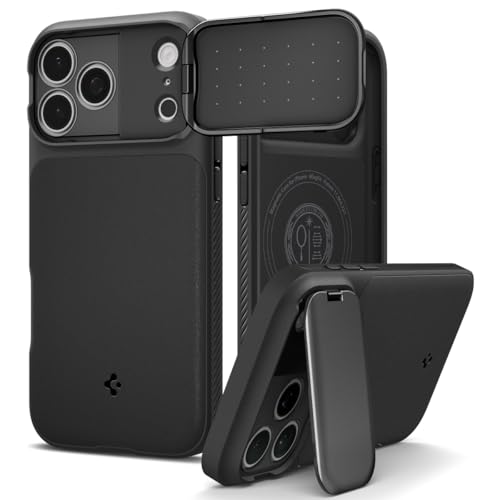
- [Dual-Layer Protection with Enhanced Grip] Built with a durable PC and TPU insert for reliable...
- [Built-in Kickstand / Camera Cover] Integrated metal camera cover also doubles as a kickstand that...
- [Maximum Drop & Camera Protection] Spigen's Air Cushion Technology in each corner delivers maximum...
Pros
- Extra camera lens protection with sliding cover
- Stand-like function for quick viewing
- MagSafe-friendly design
Cons
- Camera cover adds thickness
- Moving parts can collect lint/dust
- Not for people who want ultra-simple cases
Trade-offs / Who should skip
- Skip if you use lens add-ons that need a totally open camera area.
- If you hate anything that can snag in pockets, go simpler.
Scores: Performance 4/5 • MagSafe usability 4/5 • Ease of Use 3/5 • Value 4/5
ESR Classic Hybrid (MagSafe) — Best value hybrid (grip + protection without overspending)
ESR’s hybrid cases are usually the sweet spot for “protective enough, still slim-ish,” especially if you want magnets.
Why it wins: balanced design that fits most lifestyles without feeling like a brick.
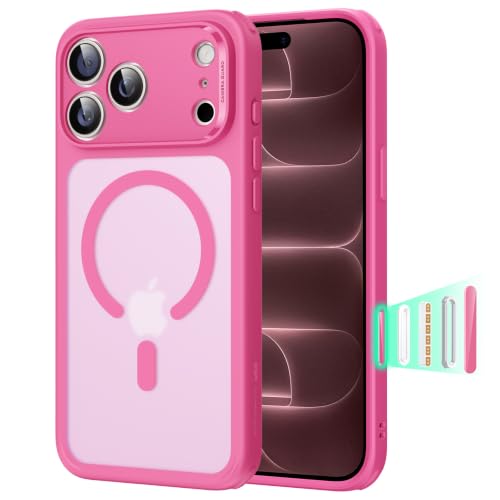
- Perfect Fit & Camera Control: designed for iPhone 18 Pro Max/17 Pro Max, this case features precise...
- 3X Military Drop Protection: SGS-tested to withstand 11 ft drops, Air Guard corners absorb impacts...
- Stronger Magnetic Lock: built-in magnets deliver up to 1,500 g of holding force for a stronger...
Pros
- Good day-to-day protection for the bulk
- MagSafe-friendly for accessories
- Generally easy to install/remove
Cons
- Can scuff over time
- Not the most premium feel
- Button feel varies by sub-model
Trade-offs / Who should skip
- If you’re constantly outdoors/on ladders/at worksites, go more rugged.
- If you want ultra-thin, go aramid/minimal.
Scores: Performance 4/5 • MagSafe usability 4/5 • Ease of Use 5/5 • Value 5/5
Mous Limitless — Best premium choice for mounts, wallets, and daily toughness
If you want a premium build and you actually use MagSafe/Qi2 accessories a lot, Mous is a strong upgrade pick.
Why it wins: a “buy once, keep it” feel with strong everyday durability vibes and accessory focus.
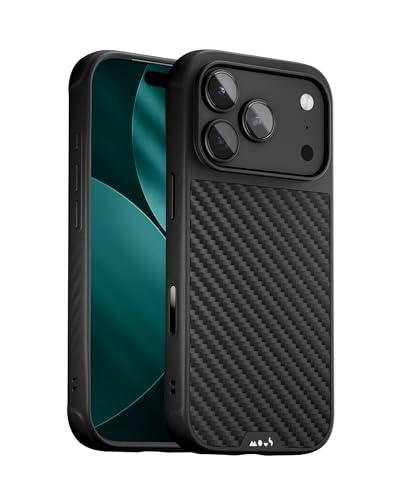
- OUR MOST PROTECTIVE CASE FOR iPHONE 17 Pro Max – Featuring Mous’ AiroShock impact-absorbing...
- PATENT-PENDING CAMERA CONTROL BUTTON – Reinforced triple-shot surround with aluminium frame...
- REINFORCED CAMERA BUMP – Engineered with a stiff, glass-filled polycarbonate surround to safeguard...
Pros
- Premium materials/finish options
- Built for accessory-heavy MagSafe use
- Good balance of protection and style
Cons
- Pricier than value hybrids
- Some versions add noticeable bulk
- Finish can show wear (depends on material)
Trade-offs / Who should skip
- Skip if you swap cases often or want budget-friendly.
- If you want crystal-clear, pick a dedicated clear case.
Scores: Performance 4/5 • MagSafe usability 5/5 • Ease of Use 4/5 • Value 3/5
Quick compare
- Most protection: OtterBox Defender Pro (B0FSNCV7VV)
- Best clear: Spigen Ultra Hybrid MagFit (B0FD1TT96X)
- Best camera-first: Spigen Optik Armor MagFit (B0FD1PVMQ2)
- Best value all-around: ESR Classic Hybrid (B0FCY9Q2F2)
- Best premium: Mous Limitless (B0FHG9XJB8)
Buying guide: how to choose fast
- If you drop your phone often: pick the bulky rugged option (Defender Pro). Higher protection, lower pocket comfort.
- If you use MagSafe mounts/wallets daily: prioritize the MagSafe usability score (Mous, then Spigen/ESR).
- If you care about photos and lens safety: choose a case with a strong camera lip or a camera cover (Optik Armor).
- If you want the phone’s color to show: go clear hybrid (Ultra Hybrid), knowing clears can yellow over time.
- If you hate bulk: skip rugged cases and consider slim hybrids (ESR/Spigen) instead.
FAQs
Do iPhone 17 Pro Max cases fit iPhone 16 Pro Max?
Usually, no camera bumps, button layouts, and dimensions tend to change. I’d buy a case that explicitly says iPhone 17, Pro Max.
Will these work with MagSafe and Qi2 chargers?
The MagFit/MagSafe-labeled picks are designed for magnetic charging and accessories, but real-world “stickiness” varies by case thickness and magnet design. If you rely on car mounts, I’d pick a brand that emphasizes magnets (Mous/Spigen/ESR).
Is a camera cover worth it?
It’s worth it if your phone often goes into bags/pockets with keys or gets set down on rough surfaces. If you use lens accessories, a cover can get in the way.
As an Amazon Associate, I earn from qualifying purchases.