
Best iPad Keyboards (2026): Top Picks for Notes, School, and Laptop-Like Typing
As an Amazon Associate I earn from qualifying purchases. Some links may earn us a commission at no extra cost to you.
If you want your iPad to feel “laptop-like,” the keyboard choice usually comes down to (1) how stable it is on your lap, (2) trackpad quality, and (3) whether it’s Smart Connector (no charging) or Bluetooth (more flexible).
How I researched
I compared recent roundups and spec sheets, prioritized lap stability and trackpad usability (because that’s what makes an iPad keyboard feel “real”), checked fit/compatibility details by iPad generation, noted power/connect method, and avoided unclear or mismatched variants.
Top picks
Eisuiyi Keyboard Case for iPad Pro 11-inch (M4/M5) — Best for “most laptop-like” feel (budget pick)
If you’re on an 11-inch iPad Pro and want a trackpad-driven, laptop-style typing experience without paying Apple Magic Keyboard prices, this is a strong stand-in. Why it wins: a built-in Multi-Touch trackpad, a magnetic protective cover with full front-and-back coverage, and a Pencil holder, at a fraction of the cost of Apple’s official keyboard.
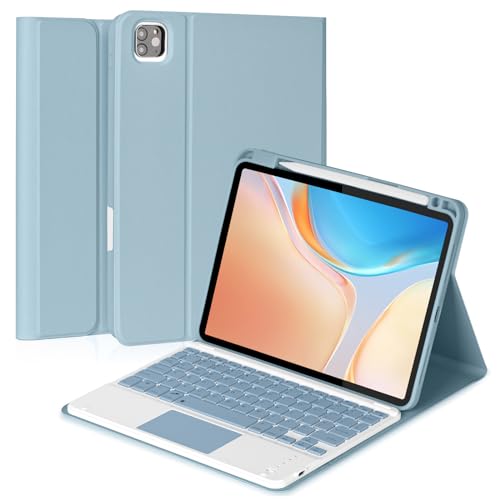
- 【Compatibility】This bluetooth keyboard case is compatible with iPad Pro 11inch (M4) 2024 released (Model: A2836/A2837/A3006), iPad Pro 11inch (M5) 2025 released (Model: A3357/A3358/A3359). Please note it doesn't fit for iPad Pro11 1st/2nd/3rd/4th gen.
- 【Multi-touch Trackpad】The keyboard is equipped with a multifunctional touchpad that supports multiple gestures. With this keyboard case, your ipad will turn into a high performance and easy to use laptop. Note: Please upgrade your tablet software to iPad OS13.4 to fully access to the touchpad function.
- 【Magnetically Detachable Keyboard】This iPad Pro 11inch (M4)/(M5) case with keyboard is magnetic so it can be easily repositioned or removed from the case. The case has 3 grooves to adjust the viewing angle as you like, make your ipad stand steadily. You can adjust to the optimal angle for studying, working, or entertaining.
Pros
- Built-in Multi-Touch trackpad for cursor-based iPadOS workflows
- Magnetic protective cover guards front and back
- Strong review track record (4.2★, 81 reviews)
- Significantly cheaper than Apple’s Magic Keyboard
Cons
- Requires Bluetooth pairing and its own charging (no Smart Connector convenience)
- No dedicated function row like Apple’s keyboard
Social proof: See reviews on Amazon.
Trade-offs / Who should skip: Skip if you want Apple’s pairing-free Smart Connector convenience or a dedicated function row — go with the official Magic Keyboard instead.
Scores: Performance 4/5 · Primary metric (lap stability) 4/5 · Ease of Use 4/5 · Value 5/5
mobee Magic Keyboard Case (iPad Air 11-inch) — Best for flexible modes (desk + couch + tray table)
For iPad Air owners, this magnetic stand-style case offers an Apple Magic Keyboard-style typing and trackpad experience without the Apple price tag. Why it wins: an easy-set magnetic stand for multiple viewing angles, a built-in trackpad, and 7-color backlighting, all in one detachable case.
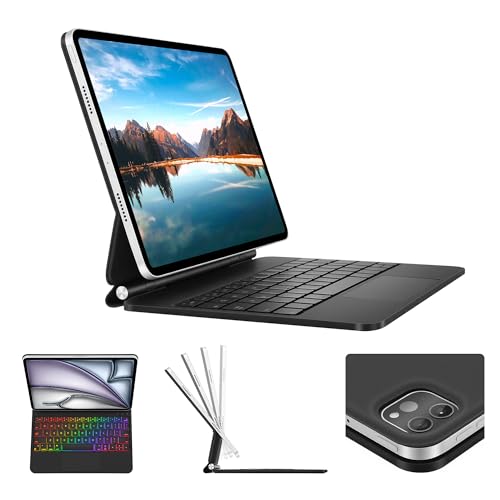
- Compatibility: Specifically customized for the iPad Air 11 inch (M4/M3/M2, 2026/2025/2024)-A2904,A3266,A3267,A3270, A2902, A2903, A3459, A3460. 2022 iPad Pro 11 inch 4th generation (A2435, A2759, A2762, A2761), 2021 iPad pro 11 inch 3rd gen ( A2459, A2301, A2460), 2020 iPad pro 11 inch 2nd gen (A2068, A2228, A2231), 2018 iPad pro 11 inch 1st gen (A1980, A1979,A1934, A2013), 2022 iPad air 5th gen (A2588, A2591, A2589), 2020 iPad air 4th gen(A2071, A2325, A2316, A2324), Please check your iPad model before purchasing.Incompatible iPads will not attach magnetically. ❌Not compatible with iPad pro 11 inch M5/M4 version. ❌Not for iPad 10/11th.
- Smart Features: Magnetically attach your iPad to the back cover, instantly turning your tablet into a laptop. Also folds into a protective case for front and back coverage.
- Multi-Touch Trackpad: Built-in precision trackpad with full gesture support — navigate like using a mouse. Edit documents, build presentations, and browse the web with ease.
Pros
- Magnetic “easy-set” stand for quick angle changes
- Built-in trackpad for iPadOS gestures
- 7-color backlit keys
- Strong rating (4.8★)
Cons
- Newer product with a smaller review base (14 reviews) than more established brands
- No physical kickstand — relies on the magnetic stand design
Social proof: See reviews on Amazon.
Trade-offs / Who should skip: Skip if you want a long-established brand with a large review history, or you prefer a hinge-style kickstand over a magnetic stand.
Scores: Performance 4/5 · Primary metric (lap stability) 4/5 · Ease of Use 5/5 · Value 4/5
kaidisen Keyboard Case with Mouse (iPad 10th gen / iPad A16) — Best for students on base iPad
For the regular iPad, this is a budget-friendly two-in-one option: a detachable keyboard case plus a separate Bluetooth mouse. Why it wins: it’s significantly cheaper than Apple’s Magic Keyboard Folio while still covering typing and pointer input, with a strong review history.
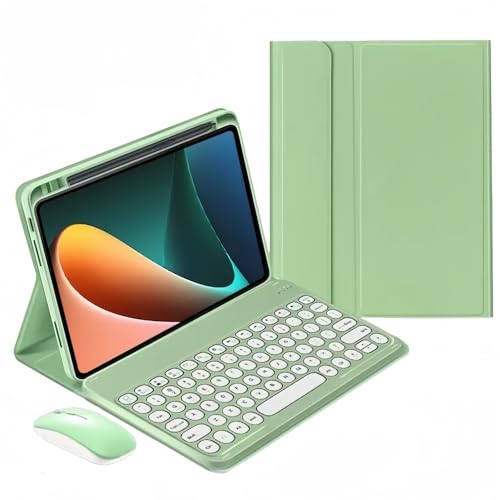
- ★ 【Keyboard Case with Mouse】 Color keyboard case mouse compatible with iPad A16 11th Generation 2025 11 inch , iPad 10th Generation 10.9-inch 2022 release Model number (on the back cover):A2696 , A2757 , A2777
- ★ 【Round key color keyboard】Magnetic detachable rechargeable cute round key color keyboard , not only can be used for iPad, but also It can used for other tablets, phones, and computers with Bluetooth functionality.
- ★ 【Bluetooth mouse】Cute color bluetooth mouse,support Bluetooth connection and 2.4GH wireless connection,The color Bluetooth mouse can be charged, No need to replace the battery,Suitable for various tablets, laptops, and desktop computers.
Pros
- Includes a Bluetooth mouse, not just a keyboard
- Large review base for the price tier (4.1★, 49 reviews)
- Detachable, candy-color round-key design
Cons
- No built-in trackpad — uses a separate mouse instead of Apple’s integrated trackpad
- Round-key layout feels different from a standard laptop keyboard
Social proof: See reviews on Amazon.
Trade-offs / Who should skip: Skip if you specifically want an integrated trackpad like Apple’s Magic Keyboard Folio rather than a separate mouse.
Scores: Performance 3/5 · Primary metric (lap stability) 4/5 · Ease of Use 4/5 · Value 5/5
Hamile Bluetooth Keyboard and Mouse — Best for travel + multi-device typing
This is a different approach: a rechargeable wireless keyboard and mouse combo built for switching between devices on the go. Why it wins: it works across iPad 11th/10th/9th generation, Pro, Air, and Mini models, plus iPhone — true multi-device flexibility with 7-color backlighting, backed by a strong review history.
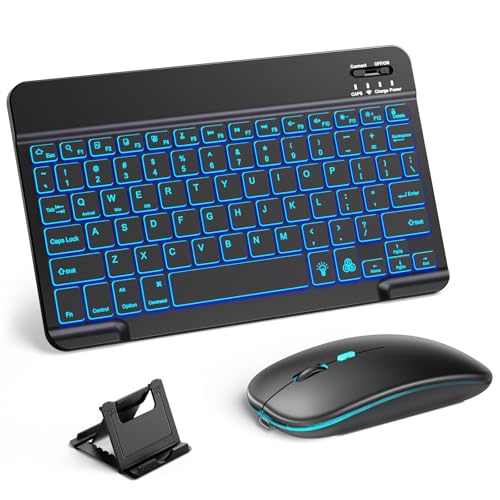
- 【Wide Compatibility】This Bluetooth keyboard and mouse combo offers wide compatibility with iPad (A16 chip, 11th/10th generation), with iPad Pro, Air, and Mini series, as well as iPhone 17/16/15 and other smartphones and tablets. In addition, the wireless keyboard and mouse are compatible with iOS, Windows, and Android—any Bluetooth-enabled device should work seamlessly. (Note: Please ensure your system is running iPadOS/iOS 13 or above.)
- 【7-Color Rainbow Backlight】The vibrant 7-color backlit for iPad keyboard makes typing or working at night more enjoyable. You can switch between the seven colors or activate the automatic color-cycling mode. Additionally, once the mouse is connected, its lights will also cycle through colors automatically. Please note: The mouse lighting cannot be turned off.
- 【Rechargeable Mouse and Keyboard】The built-in rechargeable battery (420mAh) provides up to 90 days of standby time and 45 hours of continuous use with backlight off. The wireless keyboard and mouse combo only requires 3–4 hours to be fully charged. Recommendation: A 6-hour initial charge is recommended for optimal battery performance.
Pros
- Works across iPad Pro, Air, Mini, and iPhone
- 7-color backlit keys
- Rechargeable, no disposable batteries
- Strong review track record (4.2★, 88 reviews)
Cons
- Not a fitted case — it’s a standalone keyboard and mouse, so it won’t protect your iPad’s screen
- Bluetooth means battery/charging management
Social proof: See reviews on Amazon.
Trade-offs / Who should skip: Skip if you want a single fitted case that protects your iPad and types in one piece — this is a separate keyboard and mouse accessory, not a case.
Scores: Performance 4/5 · Primary metric (lap stability) 3/5 · Ease of Use 4/5 · Value 4/5
Nillkin Magnetic Keyboard Case (Air/Pro 11-inch variants) — Best rugged magnetic “Magic Keyboard-style” pick
If you want the floating-magnetic style with extra protection, Nillkin is a well-reviewed alternative with a trackpad, backlit keys, and a rugged build. Why it wins: confirmed compatibility across both iPad Air 11″ and iPad Pro 11″ generations, plus portrait/landscape support and a higher review count than most third-party options.

- MILITARY-GRADE PROTECTION — YOUR iPad WALKS AWAY — We dropped this case. Off desks, out of backpacks, off a workbench at a job site. 1.2-meter drop tested. Corner air-cushion bumpers take the hit before your screen does. A heavy-duty TPU frame and reinforced polycarbonate back earn the word "rugged." Stain-resistant faux leather wipes clean after the job — mud, grease, coffee, gone. The sliding camera cover shields your lens and your privacy — open it when you need it, closed when you don't.、
- PRECISION FIT — CHECK YOUR MODEL IN SECONDS — Compatible with iPad Air 11-inch M3 2025 (A3266/A3267/A3270), M2 2024 (A2902/A2903/A2904), iPad Air 5th Gen 2022 (A2588/A2589/A2591), iPad Air 4th Gen 2020 (A2072/A2316/A2324/A2325) and iPad Pro 11-inch 1st-4th Gen (A1980/A2013/A1934/A1979, A2228/A2068/A2230/A2231, A2301/A2377/A2459/A2460, A2435/A2759/A2761/A2762). NOT compatible with iPad Air 11-inch M4 (2026) or iPad Pro 11-inch M4/M5. Find your model: Settings > General > About, tap Model Number.
- MAGNETIC CONNECTION — LANDSCAPE, PORTRAIT, ANYWHERE — The case locks onto the keyboard stand with a built-in magnetic ring — no clips, no latches. Working landscape? Set it down and type. Reading portrait? Lift the case, rotate it 90°, and set it back — the stand stays right where it is. The ring also mounts the case to any iron surface: fridge door, metal shelf, machine frame. For non-iron surfaces, add the Nillkin SnapHold Ultra ring (sold separately). (Not compatible with Magsafe.)
Pros
- Magnetic “floating” style with trackpad and backlit keys
- Rugged build with camera cover
- Portrait and landscape modes
- Higher review count and rating than most alternatives (4.3★, 28 reviews)
Cons
- Priced closer to mid-range than true budget ($99.99)
- Bulkier than slim folio-style cases due to rugged design
Social proof: See reviews on Amazon.
Trade-offs / Who should skip: Skip if you want a true budget price point — at this price, Apple’s own Magic Keyboard becomes a closer comparison.
Scores: Performance 4/5 · Primary metric (lap stability) 4/5 · Ease of Use 4/5 · Value 3/5
Quick compare
- Most laptop-like, budget pick (Pro 11″): Eisuiyi Keyboard Case
- Best “modes” keyboard (Air): mobee Magic Keyboard Case
- Best for base iPad (10th/A16): kaidisen Keyboard Case with Mouse
- Best travel flexibility: Hamile Bluetooth Keyboard and Mouse
- Best rugged magnetic option: Nillkin Magnetic Keyboard Case
As an Amazon Associate, I earn from qualifying purchases.