
Top-rated All-In-One Home Printers (Print/Scan/Copy)
As an Amazon Associate, I earn from qualifying purchases. Some links may earn us a commission at no extra cost to you.
Most homes do best with an all-in-one that’s reliable, doesn’t chew through ink, and prints fast enough for school/work bursts. For scoring, I prioritized black print speed (ppm/ipm) because it’s the quickest proxy for “will this feel slow every day?”
Top picks
Brother MFC-J4335DW — Best overall for most homes (fast, low-hassle ink system)
If you want one printer to do homework packets, forms, and occasional color, this is the most balanced pick. Why it wins: quick everyday printing plus an ink approach aimed at fewer cartridge headaches.

- UP TO 1-YEAR OF INK IN-BOX¹ – Enjoy exceptional convenience and savings with enough ink for up to...
- REVOLUTIONARY INKVESTMENT TANK TECHNOLOGY – Internal ink tank system works with front-loading...
- COMPACT ALL-IN-ONE FUNCTIONALITY – Print, copy, scan, and fax with fast speeds, duplex printing...
Pros
- Solid black speed for an inkjet (listed up to ~20 ppm)
- Auto duplex printing
- All-in-one features (print/scan/copy; listing notes fax on some configs)
Cons
- Inkjets can clog if you rarely print
- Color photo quality isn’t the main focus
Who should skip / failure cases: If you print only a few pages per month, a mono laser is usually safer (less clog risk). If you need the cleanest photo prints, I’d lean Canon.
Scores: Performance 4/5 · Black-speed metric 4/5 · Ease of use 4/5 · Value 4/5
Epson EcoTank ET-3850 — Best for high-volume printing with low refill hassle
This is for households that print a lot (school, crafts, forms) and want fewer cartridge swaps. Why it wins: refillable tank system + strong feature set (ADF + Ethernet) for a “home office” style setup.
No products found.
Pros
- Listed up to ~15.5 ppm black
- Auto 2-sided printing
- ADF for multi-page scanning/copying
Cons
- Higher upfront commitment than basic cartridge models
- If it sits unused for long stretches, any inkjet can need cleaning cycles
Who should skip / failure cases: If you only print occasionally, the refill advantage matters less; consider the simpler ET-2800 or a laser. If you need blazing text speed, HP 9025 is faster on paper.
Scores: Performance 4/5 · Black-speed metric 3/5 · Ease of use 4/5 · Value 4/5
HP OfficeJet Pro 9025 — Best for fastest home-office bursts (paperwork + scanning)
If you run lots of forms, invoices, or school packets and want speed, this one stands out. Why it wins: the listing shows higher print speed than most home inkjets and it’s built around productivity.

Pros
- Listed up to ~24 ppm black
- Duplex printing
- Strong “workhorse” positioning for frequent jobs
Cons
- Bigger footprint than compact home models
- Ink costs depend heavily on how you print (draft vs normal, coverage)
Who should skip / failure cases: If you hate maintaining inkjets or you print once in a blue moon, a mono laser is usually less annoying. If you print lots of photos, Canon tends to be a nicer fit.
Scores: Performance 4/5 · Black-speed metric 5/5 · Ease of use 4/5 · Value 3/5
Canon PIXMA TR8620a — Best for families who also print photos (still has an ADF)
This is the “documents + nicer color/photo” all-in-one pick. Why it wins: photo-friendly Canon approach while keeping home-office basics like duplex and an ADF.

- Never run out of ink. Connect your printer to Alexa and receive notifications when you’re running...
- Enrolling in Smart Reorders with Alexa ensures that you never have too much or too little ink...
- Wireless 4-in-1 (Print | Copy | Scan | Fax)

Pros
- Listed around ~15 ipm black / ~10 ipm color
- Auto 2-sided printing
- ADF helps with multi-page scans
Cons
- Ink cost can add up if you print lots of color
- Not the fastest for heavy text-only workloads
Who should skip / failure cases: If you mostly print black-and-white docs, a mono laser will be cheaper and more consistent. If you need very high monthly volume, a tank printer is usually a better match.
Scores: Performance 4/5 · Black-speed metric 3/5 · Ease of use 4/5 · Value 3/5
Brother HL-L2350DW — Best for simple, reliable black-and-white printing
If you mostly print homework, shipping labels, and forms, this is the low-drama choice. Why it wins: mono laser reliability + fast duplex text printing.
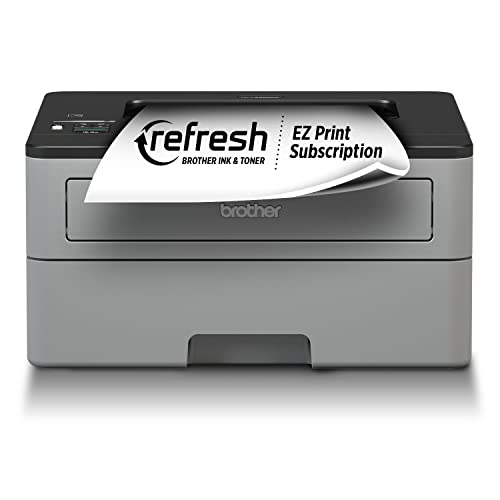
- Fast print speeds up to 32ppm (Based on one-sided printing. Change from default setting required.)
- Print wirelessly from mobile devices (Requires connection to a wireless network)
- Automatic duplex (2-sided) printing
Pros
- Listed up to ~32 ppm black
- Automatic duplex
- Great “prints when you need it” reliability profile vs inkjets
Cons
- No color
- No built-in scan/copy (printer only)
Who should skip / failure cases: If you must scan/copy regularly, pick an all-in-one. If you need color worksheets or photos, this won’t work.
Scores: Performance 4/5 · Black-speed metric 5/5 · Ease of use 4/5 · Value 5/5
Quick compare
- Most homes (mix of school + color + scans): Brother MFC-J4335DW
- Most pages per month (refill tanks): Epson EcoTank ET-3850
- Fastest “home office” paperwork: HP OfficeJet Pro 9025
- Best for photo + documents combo: Canon PIXMA TR8620a
- Most reliable basic text printer: Brother HL-L2350DW
Buying guide
- If you print rarely: I’d go mono laser (less clog risk than inkjets).
- If you print daily/weekly in volume: I’d go EcoTank (refillable ink convenience).
- If you scan stacks of pages: I’d pick a model with an ADF.
- If homework includes lots of color pages: I’d avoid mono laser as the only printer.
- If speed matters most: prioritize higher black ppm/ipm and duplex.
FAQs
Should I buy inkjet, tank, or laser for home?
If I print occasionally, I prefer laser (black-only) for reliability. If I print a lot, I prefer tank. If I need color but not huge volume, a cartridge inkjet can still make sense.
Do I really need duplex printing?
If I print school packets, forms, or readings, yes—auto duplex saves paper and feels less annoying long-term.
What’s the easiest “one printer” setup?
An all-in-one with Wi-Fi, auto duplex, and (ideally) an ADF is the least fiddly for most homes.
As an Amazon Associate, I earn from qualifying purchases.